You can open multiple Twitch streams simultaneously to follow live matches, events, or active Drops campaigns. However, watching multiple streams does not mean you will earn more rewards or stack your Drops progress faster. This article will explain how Twitch calculates watch time, common Multi-Stream methods, and the role of an Antidetect Browser when you need to manage multiple Twitch profiles or accounts.
1. What are Twitch Drops and how is watch time calculated?
Before exploring whether watching multiple streams yields more Drops, you need to understand clearly how Twitch Drops work and how watch time is logged.
1.1. What are Twitch Drops?
Twitch Drops are rewards granted to viewers for watching eligible content on the Twitch platform. These rewards are typically deployed alongside a specific game, event, or campaign, and can include in-game items or other gifts depending on the promotion.
Drops are always tied to a specific game, event, or campaign. A campaign in this context is a Drops distribution program organized by game publishers in partnership with Twitch for a set period.
To receive Drops, viewers must fulfill the conditions specified by the campaign. Usually, conditions involve watching eligible content for a specified duration. After completing the requirement, you may need to visit your Drops Inventory to check progress and claim your rewards.

1.2. How do Drops campaigns operate?
A Drops campaign is a limited-time program with specific conditions for viewers to unlock rewards. Each campaign may require you to follow a specific game, event, or group of channels, and required watch times can vary accordingly.
A campaign can contain multiple rewards that unlock at different time milestones. Therefore, before watching, you should check campaign details to know which content is eligible and how long you need to watch. Not every live stream playing on Twitch counts toward Drops progress.
1.3. How does Twitch track Drops progress?
According to official Twitch guidelines, receiving Drops involves three steps: accumulating time on Twitch, claiming the reward on Twitch, and receiving the item in-game.
The deciding factor in the first step is watch time. You must watch the correct channel or content that fulfills campaign requirements for time to be logged.
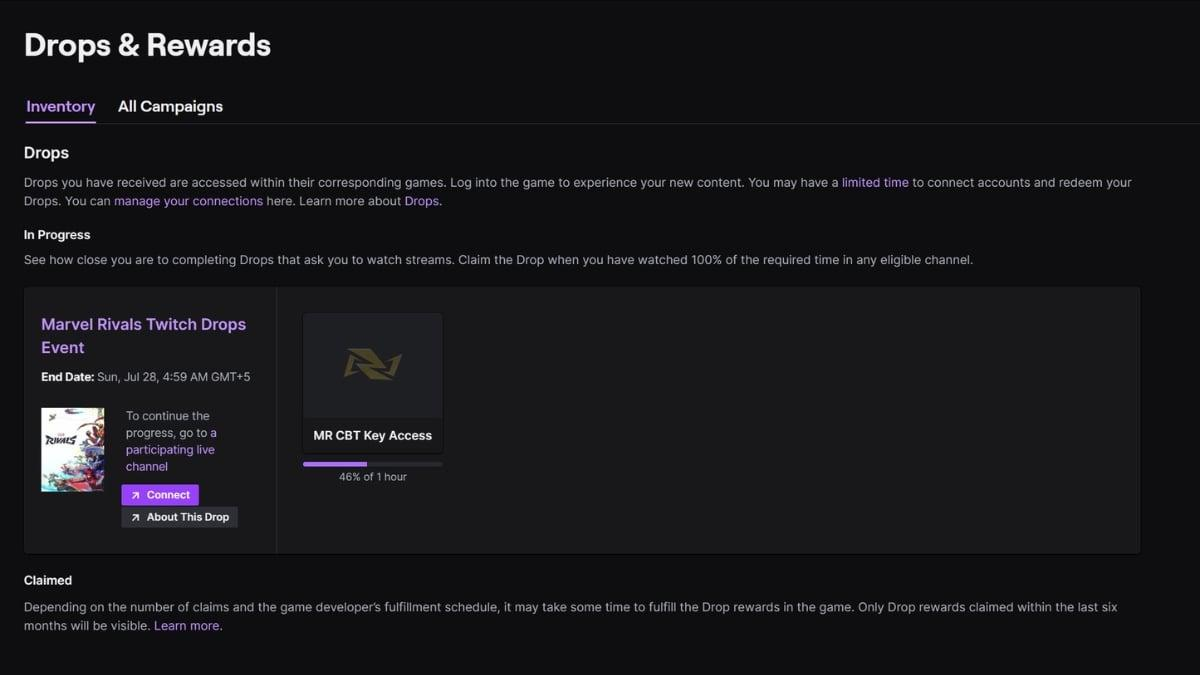
You can track your progress and rewards on the Drops Inventory page at twitch.tv/drops/inventory. When you meet requirements, some rewards must be claimed manually before they expire.
Most items will appear in-game within 24 to 48 hours, depending on the campaign.
2. Does watching multiple Twitch streams at once count for Drops?
This is a crucial question if you want to open multiple live streams concurrently to follow content and optimize your watch time for Drops campaigns.
2.1. Can you open multiple Twitch streams at once?
You can easily open multiple Twitch live streams simultaneously by using multiple browser tabs or windows. This is a simple method to follow multiple channels without installing extra tools.
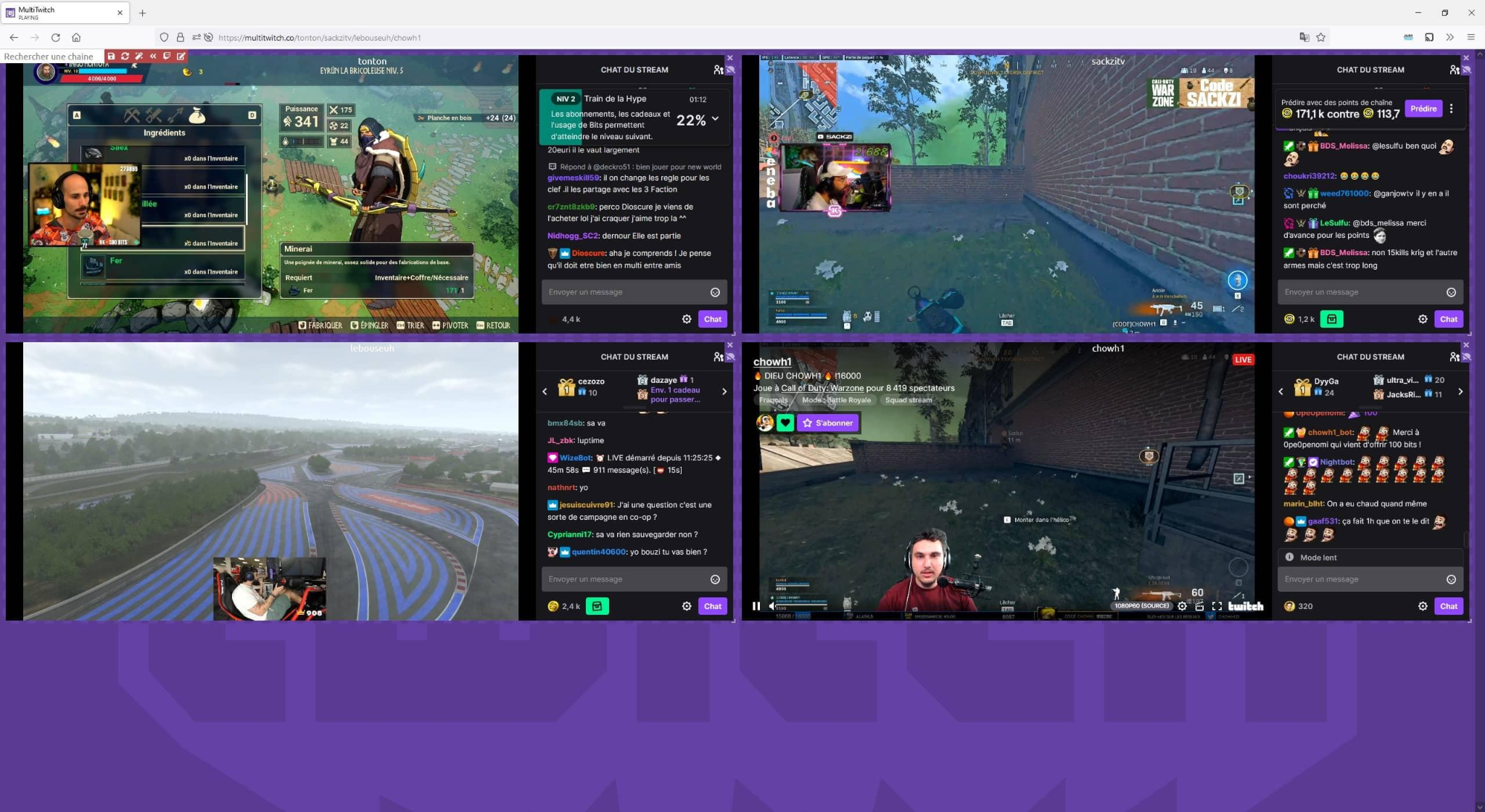
Additionally, you can use Multi-Stream tools to display multiple live streams on a single layout grid. This is convenient when you want to observe multiple channels at once, especially during esports tournaments or events with several broadcasts running.
However, you must clearly distinguish between opening multiple streams, actually watching multiple streams, and having Twitch log Drops progress. Having multiple streams playing on your screen does not mean watch time is multiplied by the number of streams.
2.2. Does watching multiple streams increase Drops progress?
The answer is no. According to official Twitch documentation, you are eligible to earn Drops for only one active channel at a time, and watching multiple channels simultaneously will not yield more Drops.
How Twitch logs watch time depends on the mechanics and rules of each Drops campaign. If multiple channels participate in the same campaign, you should still check the specific campaign conditions to see how watch time is registered.
For instance, a user might open 4 channels participating in a Drops campaign on the same account for 2 hours. However, when checking the Drops Inventory, progress might not increase 4x as expected. This demonstrates that the number of open streams is not the sole factor determining Drops progress speed.
Therefore, it shouldn't be blindly assumed that Twitch strictly tracks only one channel or always stacks time across multiple streams. Calculation methods can depend on campaign conditions and should be verified via official Twitch documentation.
2.3. Can you earn Drops from multiple channels simultaneously?
Watching multiple channels and earning multiple rewards are two distinct matters. Multiple channels can participate in a single Drops campaign, but that does not mean you will earn an individual reward from each channel you are watching.
Drops are usually determined based on the campaign and its specified conditions rather than the sheer count of active channels. Therefore, to understand how watching multiple channels affects progress, check the specific guidelines of the campaign you are joining.
2.4. Can you earn multiple Drops from different campaigns?
A distinction must be made between multiple streams belonging to the same campaign versus streams belonging to different campaigns.
Each Drops campaign may have unique requirements regarding games, content, watch times, or eligible channels. Consequently, your ability to earn multiple rewards depends on the rules of each respective campaign.
Multi-Streaming helps you monitor diverse content simultaneously, but using Multi-Stream tools does not automatically guarantee you will receive more Drops.
3. Methods for watching multiple Twitch streams simultaneously
If your goal is to follow multiple live streams within the same timeframe, there are several popular methods to choose from. Each option fits different operational needs.
3.1. Opening multiple browser tabs or windows
The simplest approach is opening each live stream in a separate browser tab or window. You do not need to install additional tools and can start watching immediately upon accessing Twitch.
This method is suitable if you only want to follow a small number of streams. However, as tab counts grow, management becomes difficult. Multiple concurrent live streams also consume significant CPU, RAM, and network bandwidth.
If you use a standard browser profile, active sessions remain inside the same browser environment. This is fine for single-account usage, but becomes inconvenient when managing multiple independent accounts or sessions.
3.2. Using Multi-Stream tools
Multi-Stream refers to third-party tools or websites that embed multiple live streams into a single grid layout instead of separate tabs. This allows you to observe multiple streams on one interface.
This approach works well for monitoring multiple channels during tournaments or events involving several streamers. The primary advantage is being able to view and manage streams effortlessly without switching tabs constantly.
However, Multi-Stream tools only alter how broadcasts are displayed and monitored. Whether watch time is credited for Drops still depends on Twitch and campaign rules, not on the Multi-Stream tool itself.
3.3. Utilizing multiple Twitch accounts
If you own multiple Twitch accounts, you can use them to maintain separate login sessions. Each account can be logged in and managed independently, though this is more complex than opening multiple tabs on a single account.
When using multiple accounts, you must adhere to Twitch policies and guidelines. Isolating browser environments helps manage cookies, sessions, and login credentials easily, especially when switching between accounts frequently.
However, do not assume using multiple accounts guarantees more Drops or parallel farming success. The primary benefit of environment isolation remains clean, organized multi-session management.
4. Managing multiple Twitch accounts when watching multiple streams
If you only watch a few streams on a single account, opening multiple tabs is straightforward. However, when managing multiple Twitch accounts and concurrent login sessions, swapping between accounts becomes cumbersome. Isolate browser profiles to make management systemic and hassle-free.
4.1. Why managing multiple accounts on a single browser can be inconvenient
Switching between multiple accounts on the same browser instance, cookie jar, and session storage complicates management. You can easily log into the wrong account or lose track of which profile is watching which stream.
Manually logging in and out for every switch wastes time. As active sessions multiply, organizing accounts and tracking session states manually becomes inefficient.
4.2. How an Antidetect Browser helps manage multiple Twitch profiles
An Antidetect Browser allows you to create and operate multiple separate browser profiles. Each profile stores its own independent cookies, local storage, and session data, making it easy to maintain active sessions without logging out on a unified browser.
For Twitch account management, Antidetect Browsers excel at profile separation and organization. Proxies can also be assigned to individual profiles if distinct network connections are needed, though they are not strictly required for watching Twitch or claiming Drops.
Learn more: What is an Antidetect Browser? Why it is more powerful than VPNs & proxies
4.3. Setting up multiple Twitch profiles with an Antidetect Browser
After choosing a suitable Antidetect Browser, you can begin creating dedicated profiles for each Twitch account. Among available browser management tools, the antidetect browser Hidemyacc offers a solid solution for building and organizing isolated browser environments.
With Hidemyacc, each Twitch account connects to a distinct profile, simplifying tracking and eliminating session switching friction. The basic setup includes:
- Step 1: Create a dedicated profile for each Twitch account you manage.
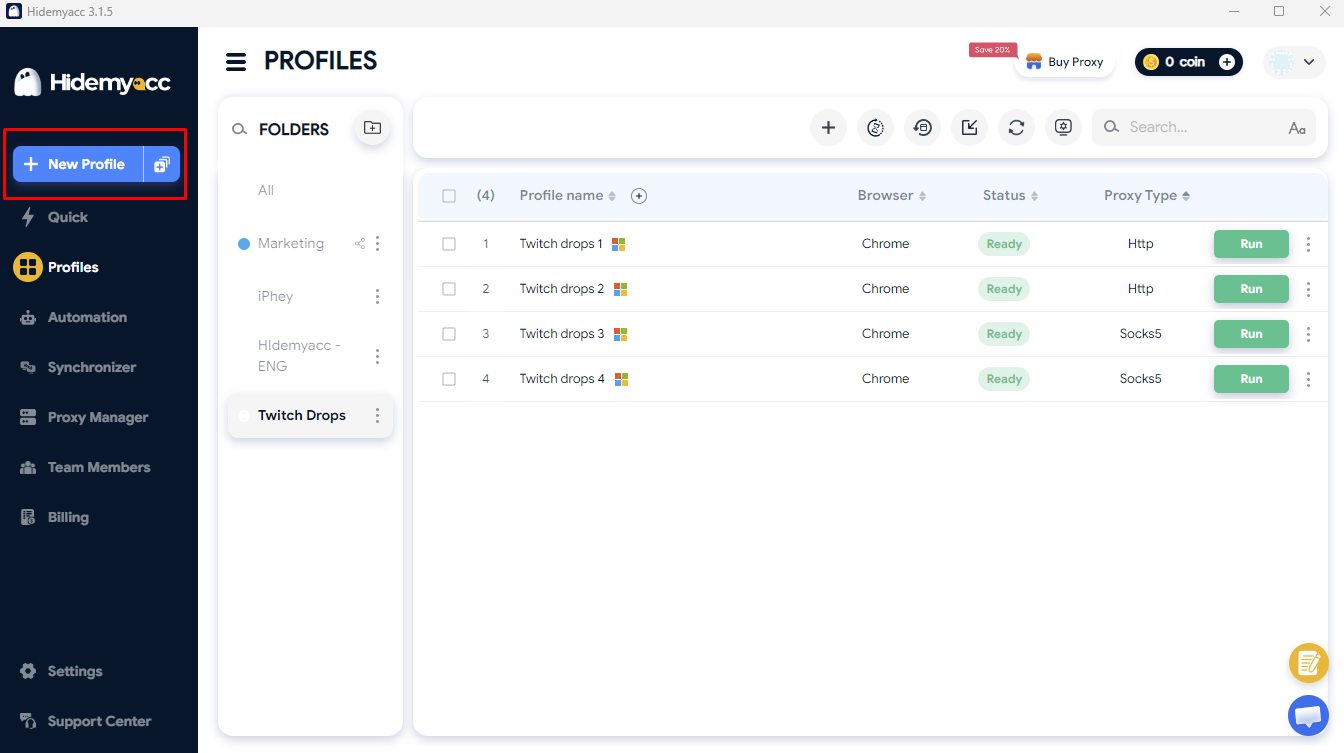
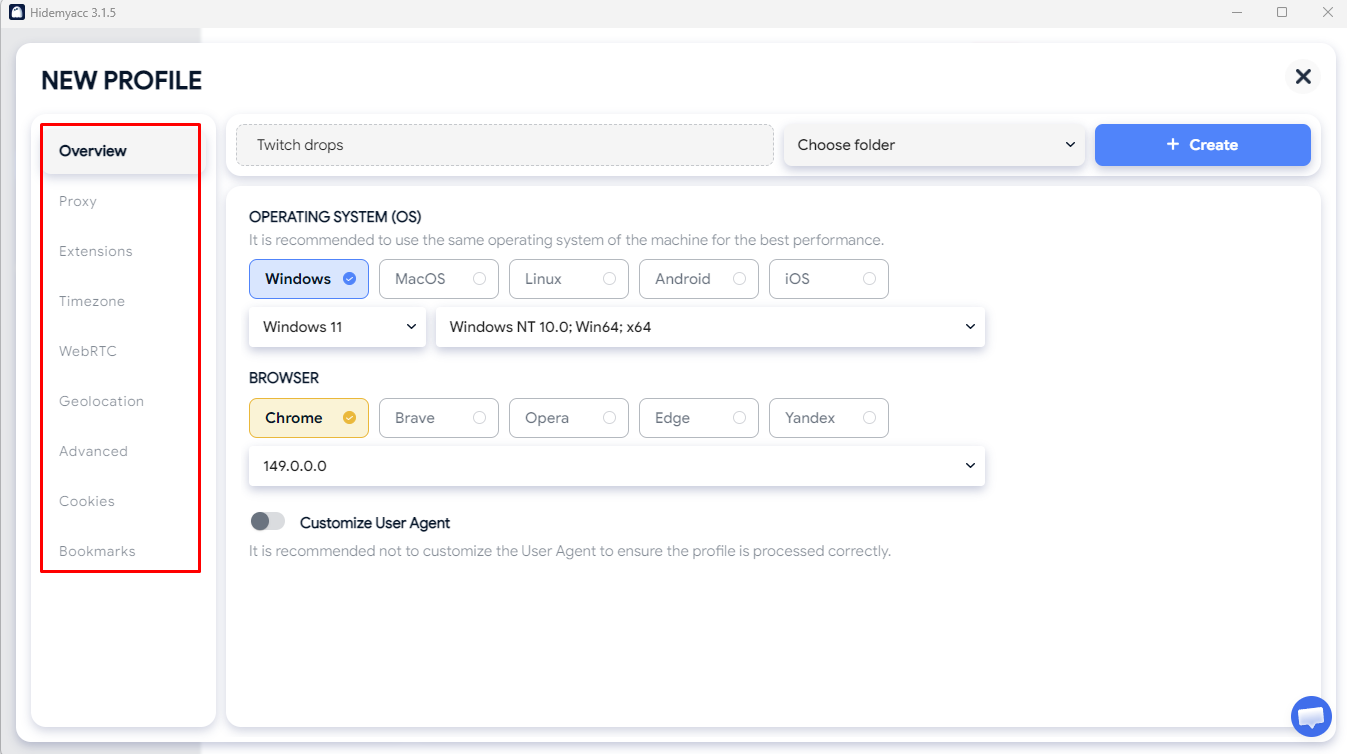
- Step 2: Configure appropriate browser environment parameters. Add a proxy to the profile if a dedicated network connection is required.
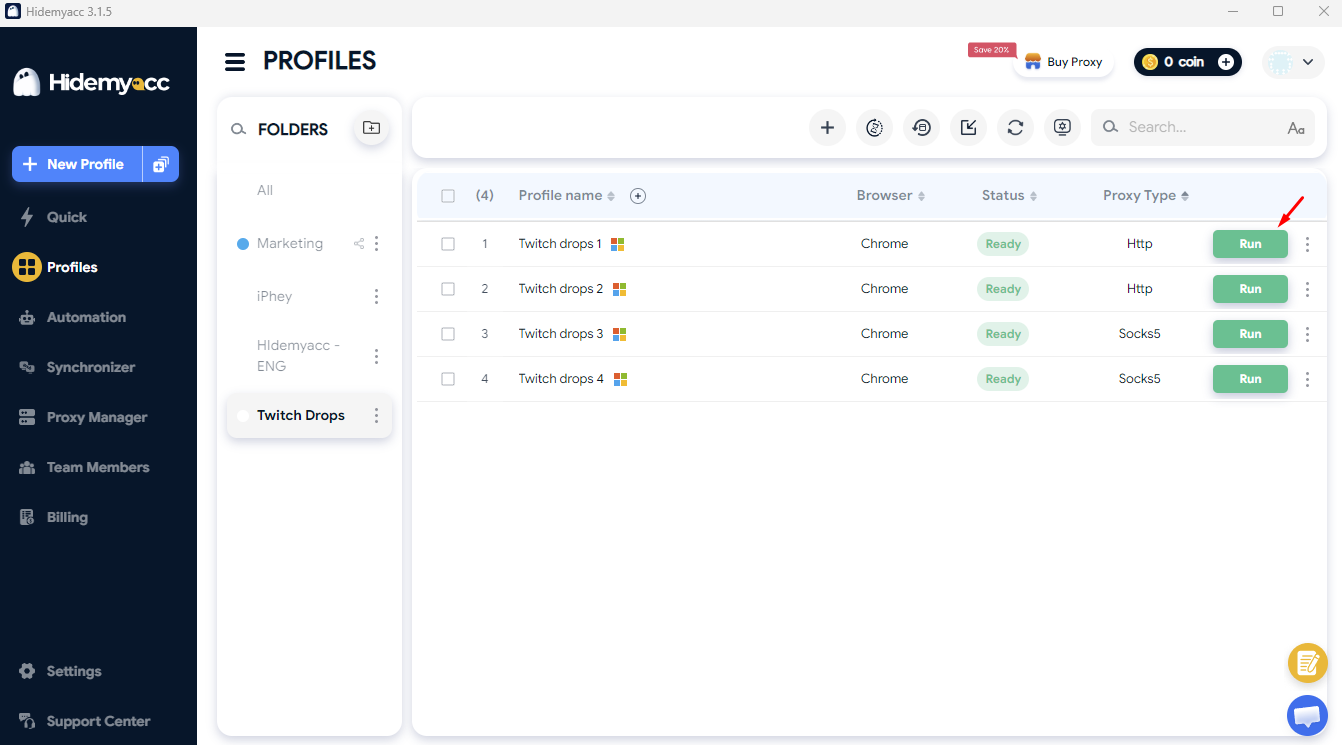
- Step 3: Log into the corresponding Twitch account within each profile. Click "Run" to launch the profile window.
- Step 4: Open eligible Drops streams in the respective profile and monitor Drops progress per account and profile.
This structure isolates accounts and login sessions clearly, avoiding manual logging on a shared browser. To explore profile creation, fingerprint customization, or proxy setups in detail, consult in-depth Hidemyacc guides.
See also: How to use proxies in Hidemyacc
5. Which method should you choose to watch multiple Twitch streams?
No single method fits every scenario. Your choice depends on the number of streams you follow, accounts you manage, and the level of session isolation required.
| Criteria | Multi-tab | Multi-Stream | Antidetect Browser |
|---|---|---|---|
| Watch multiple Twitch streams | Yes | Yes | Yes |
| Ease of setup | High | High | Medium |
| View multiple streams on one layout | No | Yes | Not directly |
| Create multiple browser profiles | No | No | Yes |
| Cookie isolation | No | No | Yes |
| Session isolation | Limited | Limited | Yes |
| Manage multiple accounts | Limited | Limited | Yes |
| Manage multiple browser environments | Low | Low | High |
| Guarantees more Drops | No | No | No |
Conclusion:
Multi-tab is suitable if you simply want to watch multiple Twitch streams at once in a basic manner. If you prefer viewing multiple streams on a unified layout, Multi-Stream is more convenient. Meanwhile, an Antidetect Browser suits users managing multiple profiles and separate login sessions. However, regardless of the method chosen, do not expect tools to alter Twitch Drops mechanics automatically or guarantee more rewards.
6. Common mistakes when watching multiple streams for Drops
Opening multiple streams simultaneously does not guarantee Drops progress will accrue as expected. Below are common mistakes to review before assuming Multi-Stream isn't working:
- Watching streams not included in the Drops campaign: Not all Twitch live streams support Drops. Verify whether the stream or campaign is eligible.
- Watching the wrong game or content: Certain campaigns require watching specific games or events. Opening multiple streams with ineligible content will not advance Drops progress.
- The campaign has ended: Drops campaigns have fixed start and end dates. Once expired, subsequent watch time will not count toward rewards.
- Accounts are not linked properly: Some Drops require linking your Twitch account to a corresponding game or service account. Incorrect linking prevents reward distribution.
- Assuming multiple streams multiply watch time: Running multiple streams concurrently does not multiply watch time for Drops progress. Always check specific campaign mechanics.
If Drops progress fails to increase as expected, check these factors systematically before altering your setup or seeking additional software tools.
7. Performance optimization tips when running multiple streams
Besides verifying Drops requirements, monitor hardware performance and network bandwidth when opening multiple live streams. Simple adjustments can improve system stability:
- Lower video quality: If you don't need high-definition visuals, reduce video resolution to fit your hardware capabilities and bandwidth.
- Mute non-essential streams: Muting secondary streams reduces distractions and preserves audio focus on primary broadcasts.
- Monitor CPU and RAM usage: Check Task Manager to ensure concurrent live streams do not overload system hardware.
- Manage network bandwidth: If video playback stutters, reduce the number of active streams or lower resolutions.
- Label profiles clearly: When running multiple profiles, name them by account or purpose for easy identification and to prevent login mix-ups.
These tips do not alter Twitch Drops mechanics, but they ensure smoother performance when managing multiple streams and browser profiles.
8. Conclusion
You can watch multiple Twitch streams simultaneously using multiple tabs, windows, or Multi-Stream tools. However, opening multiple streams does not mean your Drops progress will automatically stack or multiply by the stream count.
How Twitch logs watch time depends on individual campaign rules. For basic multi-stream viewing, Multi-tab or Multi-Stream tools are simple options. For managing multiple accounts or login sessions, an Antidetect Browser provides effective profile, cookie, and session isolation.
Regardless of your setup, an Antidetect Browser does not alter Twitch Drops mechanics or guarantee extra rewards. Always review campaign conditions and adhere to Twitch policies when managing multiple accounts or browser environments.
9. FAQ
1. Does watching multiple Twitch streams at once yield more Drops?
Not necessarily. Opening multiple streams simultaneously does not automatically stack or accelerate Drops progress. Progression depends strictly on specific campaign rules.
2. Can you use multiple Twitch tabs to earn Drops?
You can open multiple Twitch tabs at once, but playing multiple streams concurrently does not guarantee watch time is calculated in parallel. Check campaign rules to see how progress is recorded.
3. Can you earn Drops from multiple Twitch channels?
This depends on individual campaign rules. Opening multiple channels simultaneously does not guarantee you will receive additional Drops.
4. Is using multiple Twitch accounts to track Drops allowed?
You can manage multiple Twitch accounts for legitimate purposes while abiding by Twitch terms. When managing multiple accounts, isolating browser profiles makes session tracking clearer.
5. Is a dedicated proxy required for each Twitch account?
No. Proxies are not mandatory for watching Twitch or receiving Drops. In an Antidetect Browser, proxies help isolate network environments but do not accelerate Drops earnings.
6. Does an Antidetect Browser help earn Drops faster?
No. An Antidetect Browser does not alter Twitch's Drops calculation algorithms. The tool functions strictly to manage separate profiles, cookies, and login sessions.
7. Why hasn't my Drops progress updated despite watching enough time?
You may be watching an ineligible campaign or stream, the campaign may have ended, or your game account is not linked properly. Also, verify whether unlocked rewards require manual claiming in your inventory.